
Most modern shader setups use Iris on Fabric or an OptiFine-compatible shader loader.
Minecraft content hub
Minecraft Shaders
Find Minecraft shader packs for lighting, shadows, water, clouds, atmosphere, vanilla-style visuals, and performance-friendly graphics upgrades.
Use this page to narrow your Minecraft search.
Minecraft Shaders pages are focused side entrances into the library. They help players understand what to look for, then send them into filtered Browse results, official source pages, and related guides without cluttering the main navigation.
Shaders are more demanding than resource packs, so start with performance-friendly presets.
Use Sodium/Iris-compatible setups for better performance when possible.
Featured results
Popular indexed projects for this topic.
These are static examples from the current library. Open Browse for the latest dynamic results, sorting, and filters.

⬢
Complementary Shaders - Reimagined
Preserving the elements of Minecraft with exceptional quality, detail, and performance.

⬢
Complementary Shaders - Unbound
Transforming the visuals of Minecraft with exceptional quality, detail, and performance.
⬢
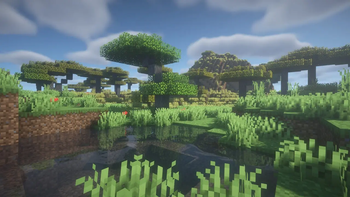
BSL Shaders
Shaderpack for Minecraft: Java Edition. It's bright, colorful, and distinct.
⬢
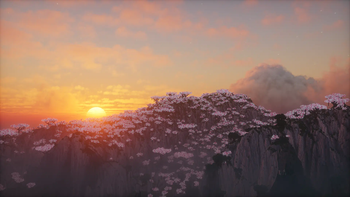
Photon Shaders
A gameplay-focused shader pack with a semi-realistic style

⬢
Solas Shader
A modern fantasy stylized shaderpack with colored lighting and stunning visuals
⬢
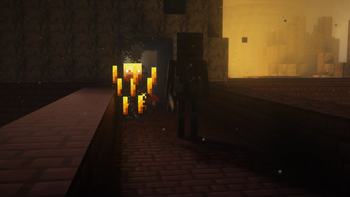
Rethinking Voxels
[WIP] A gameplay shaderpack based on complementary reimagined that has coloured block light with sharp shadows
How to use this page
Choose a shortcut above or open Browse with filters already pointed toward this topic. Then refine by Minecraft version, loader, source, category, side support, popularity, and update date. Downloads should remain on official project or creator pages whenever possible.
- Check the exact Minecraft version before downloading.
- Match the correct loader or install location before launching.
- Back up worlds before adding projects that change gameplay, world generation, inventories, recipes, mobs, loot, structures, dimensions, or server data.
- Use report links if a source, image, creator credit, or project detail looks wrong.
Related guides
Useful setup help
Install shaders with Iris or OptiFine
Set up shader support, add shader packs, and tune settings for smooth visuals.
ShadersFind compatible shaders
Pick shader packs based on your loader, hardware, and Minecraft version.
PerformanceSet up OptiFine alternatives
Use modern Fabric visual/performance mods for zoom, connected textures, entity models, and shaders.
Quick questions about minecraft shaders
Are these downloads hosted by FreeMinecraftMods?
No. Project cards point to official source pages when possible. The site is built around discovery, creator credit, and safer source visibility instead of hidden mirrors.
What should I check before downloading?
Check the Minecraft version, loader, dependencies, update date, source platform, and whether the project is client-side, server-side, or required on both sides.
Why use this page instead of only using Browse?
This page explains the category and gives fast shortcuts. Browse is still the best place to filter the full library by version, loader, category, popularity, update date, and source.
Related discovery pages
Live cross-source picks
Popular shaders
These cards pull from multiple source adapters where available, then send visitors to official project pages.
Editor-selected starting points
Projects worth comparing before you choose
These are not universal rankings. They were selected because each one represents a different use case, installation consideration, or compatibility question within this category.

⬢
Complementary Shaders - Reimagined
Preserving the elements of Minecraft with exceptional quality, detail, and performance.
Why it is here: A broad visual preset with multiple quality levels, making it useful for comparing appearance and performance.

⬢
Complementary Shaders - Unbound
Transforming the visuals of Minecraft with exceptional quality, detail, and performance.
Why it is here: Targets a more dramatic look and helps illustrate the difference between restrained and cinematic shader styles.

⬢
BSL Shaders
Shaderpack for Minecraft: Java Edition. It's bright, colorful, and distinct.
Why it is here: A widely used general-purpose shader with configurable lighting, water, shadows, and atmosphere.

⬢
Photon Shaders
A gameplay-focused shader pack with a semi-realistic style
Why it is here: Emphasizes lighting and atmospheric effects while offering multiple performance targets.

⬢
MakeUp - Ultra Fast
MakeUp aims to provide the best quality / performance ratio, building a shader that can be adapted to anyone's resources.
Why it is here: Prioritizes a lighter performance footprint for players who cannot run heavier shader packs.

⬢
Super Duper Vanilla
A shader pack created to convey the style of the cancelled Super Duper Graphics Pack and other popular Minecraft titles.
Why it is here: Keeps a vanilla-oriented direction while adding shader effects, useful for players who dislike drastic color changes.
How these projects were selected
The list favors projects with a clear official source, recognizable purpose, useful compatibility information, and enough detail for a player to understand why it belongs in this category. Popularity is one signal, but it is not the only one: lighter alternatives, dependencies, server tools, and focused visual packs can be more useful than the largest download total for a particular setup.
Always confirm the exact Minecraft version, loader, dependencies, and release notes on the official project page before installing. For world-generation projects, make a backup and test in a copied world first.
Selection guidance
How to choose from this Minecraft Shaders page
This shader hub favors projects with clear loader requirements, current source pages, and practical performance expectations for players comparing Minecraft Shaders.
Useful comparison angles: iris, optifine, shadows, atmosphere. These labels are discovery hints, not a substitute for the creator's current file notes.
What to verify first
- Confirm whether the pack expects Iris, OptiFine, or another shader loader.
- Start with conservative quality settings before increasing shadows, reflections, render distance, or volumetric effects.
- Compare frame pacing and input feel, not only a single average FPS number.
- Keep a non-shader profile available for troubleshooting resource pack or mod conflicts.
Recommended workflow
Install the shader loader first, launch without extra packs, then add the shader and tune options in a copied instance.
FreeMinecraftMods keeps download actions pointed at official source pages so visitors can review the latest files, license, dependencies, and support notes before installing.
Related paths: Browse shaders | Visual resource packs | Install shaders guide | Performance mods
Decision guides
Read these before installing projects from this page
Use the category list as a shortlist, then verify the setup with original guides that explain versions, loaders, dependencies, backups, source checks, and troubleshooting.