

Resource Pack - Modrinth
Chat Reporting Helper
An educational tool that explains chat reporting in a simple and neutral way.
Source-provided project description. FreeMinecraftMods keeps creator credit and adds separate compatibility and decision guidance below.
Project overview
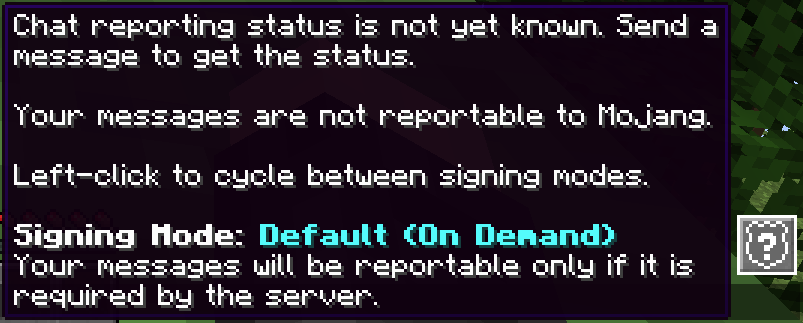
**As seen on [Fabulously Optimized](https://modrinth.com/modpack/fabulously-optimized)!** Minecraft's default in-game wording about chat reportability is technical, confusing and gives the assumption that chat reportability exists in every server. [No Chat Reports](https://modrinth.com/mod/no-chat-reports)' wording is also technical, biased towards negativity and very detailed. This resource pack fixes both by replacing those phrases with simple and unbiased, yet accurate phrases. ### What this resource pack does - Change the tooltips on vanilla report buttons and chat indicators - Change the "messages can't be verified" warning toast - Change the "Only Show Secure Chat" label and tooltip - Change the description on vanilla report textbox - Change the status icons and tooltips on [No Chat Reports](https://modrinth.com/mod/no-chat-reports) - Ensures the phrases are short, clear and non-technical - [Is available in several languages](https://crowdin.com/project/fabulously-optimized) - Is an educational tool, not a protective one - Focuses on practical use cases and actual server behavior, not theoretical possibilities - Serve as an example and call to Mojang to improve transparency and clarity regarding this feature in the game What this resource pack doesn't do - State, whether chat reportability is good or bad - Obstruct or mislead the meaning of any phrase - Edit the report icon or "Player reporting" button - Edit report or ban reasons - Edit the ban screen - Hide vanilla indicators or warning toast - Replicate the features of [No Chat Reports](https://modrinth.com/mod/no-chat-reports) or any other mod or plugin ### What do the icons mean? The icons are only shown when you have [No Chat Reports](https://modrinth.com/mod/no-chat-reports) installed. For vanilla chat indicators, hover the gray box on the left. -  - status not yet known, you must send one chat message to get it -  - no chat messages can be reported to Mojang -  - most chat messages can be reported to Mojang, but the server does not prefer it and the playing user opts out - In some cases, no messages can be reported but that is not reflected on the icon. You can confirm by seeing if you can report anyone on Social Interactions. -  - all chat messages can be reported to Mojang -  - only on Realms: all chat messages can be reported to Mojang and [Mojang is passively monitoring the chat for violations](https://help.minecraft.net/hc/en-us/articles/8047895358605-Our-Commitment-to-Player-Safety#h_01G95X76WR1PM97XBXDE7G25KE) ### Who is this resource pack for - Users, who don't understand how chat reportability works - Users, who don't understand when and where chat reportability works - Users, who are positive, neutral or slightly concerned about chat reportability - Users, who don't understand the technical terms of vanilla or [No Chat Reports](https://modrinth.com/mod/no-chat-reports) - Modpacks, that have been afraid to include [No Chat Reports](https://modrinth.com/mod/no-chat-reports) due to potential confusion or bias - Modpacks, that want to ensure users know about chat reportability and where it works - Parents, who want to ensure their children play on servers that enforce chat reportability - Realm owners, who want to know the limitations and requirements of Realms - Server owners, who enforce chat reportability and want to ensure users know how it works ### Even more questions > **Q**: Do I have to use this with [No Chat Reports](https://modrinth.com/mod/no-chat-reports)? > > **A**: No, though it is recommended to get more accurate status icons. > **Q**: Do I have to configure No Chat Reports a certain way to benefit from this? > > **A:** It has to be enabled and not whitelisting by default to get the indicator icons, any other changes are up to you. You may configure it to skip prompts automatically (set "Default signing mode" to "On Demand") to make the experience smoother. > **Q**: Should I install No Chat Reports if I like chat reportability? > > **A**: Yes, it is still recommended, as it is currently the only way to get a consistent indicator about the system being active on the server. Remember, the mod always respects the server's intent and does not contain any hacks or exploits. > **Q**: Why is this not in No Chat Reports itself? > > **A**: No Chat Reports' default phrases do a better job at describing the technical details and giving users traffic light-like indicators to assist on _avoiding_ chat reports. This resource pack is meant to be a more neutral approach similar to [Steam's "VAC-secured" indicator](https://i132.photobucket.com/albums/q3/Sierra_Oscar_2006/VAC2w.jpg) - any user can make their own call on whether seeing the shield icon is a bad or good thing. I really hope Mojang will implement something like this in the vanilla game one day. > > Edit: [Mojang implemented a similar badge](https://findmcserver.com/parents#features) in their new online server list, but not yet in-game an
FreeMinecraftMods decision guide
This resource pack is most relevant to players looking for locale, simplistic, vanilla like on minecraft. Treat those labels as discovery hints, then verify the exact file and dependency list on the official project page.
The source record was updated on Sep 20, 2026, which is a recent freshness signal. A recent date does not guarantee support for every loader or Minecraft version, so still inspect the current file list.
What to verify before choosing a file
- Confirm that the file is published by the credited creator on the linked official source.
- Match the Minecraft version exactly instead of relying only on a broad category label.
- Read dependencies, incompatibilities, and changelog notes before updating an existing instance.
- Check pack order and test for model, font, language, and interface conflicts with other packs.
Compatibility at a glance
Minecraft versions in this snapshot: 1.20.4, 1.20.5, 1.20.6, 1.21, 1.21.1, 1.21.2, 1.21.3, 1.21.4, 1.21.5, 1.21.6, 1.21.7, 1.21.8
Loaders and platforms: minecraft
Before you install
Keep the original ZIP unless the creator says otherwise. Check pack order when multiple packs change the same textures, models, fonts, or interface files.
Source, licensing, and corrections
FreeMinecraftMods does not mirror the project files. Use the official source for downloads, release notes, dependencies, support, and licensing details. Project names, images, and creator-written descriptions remain the property of their respective owners.
How listings are reviewed | Report incorrect project information | Rights-holder and DMCA information
This source record is available for discovery, but it does not yet contain enough verified description, classification, image, freshness, or compatibility information to be indexed as a full editorial page. It is therefore marked noindex and is not eligible for advertising.