

Mod - Modrinth
Ultris: Boss Expansion
Explore 8 new and exciting bosses to take on across your world, with new structures, items, and stories for you to unravel.
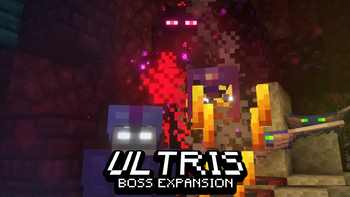
Source-provided project description. FreeMinecraftMods keeps creator credit and adds separate compatibility and decision guidance below.
Project overview
*note: older and currently unmaintained project!* *** If using the Datapack version, I recommend installing the >> [Optional Resourcepack](https://www.planetminecraft.com/texture-pack/splatus-datapack-resources-v1-0-0/) << ### [Ultris has a Discord Server for getting help and discussing my mods! Click here to join.]( https://discord.gg/SyEGYGr5BF ) # About: Ultris is a Minecraft Boss Expansion datapack that expands Minecraft with 8 new exciting bosses to take on, each with their own quests and rewards. Explore multiple new boss structures, special items, and new foes for you to take on. Unique boss patterns, boss music, stages, sounds and visuals all come together to create these awesome bosses, from bosses that can spawn early game, to bosses for the end game player. **To summon the bosses with cheats, use /function 1_splatus:ultris/admin_menu and select the option "Summon Bosses"** # Wiki: [Click here to visit the Ultris Wiki!](https://github.com/SpluoSplatus/Ultris/wiki) To view more info on bosses, you can check out the Ultris wiki by clicking the link above. The Wiki is not complete, but it can be completed faster with your help! If you'd like to contribute to the wiki, join my Discord Server, ping @limesplatus#4730 and I'll allow you access to editing. # Commands: /function 1_splatus:ultris/admin_menu # License For view of the entire license, [click here](https://github.com/SpluoSplatus/Vanilla-Refresh/wiki/License). In summary, just dont republish this project or send modified copies to other people. You may modify it in singleplayer or in your own server. You are free to add this to modpacks as well. Only one file is permitted to be edited in a public modpack, that being the mod's default settings file. This is helpful for modpack devs if they want certain features disabled from one of my mods. Join my discord if you need help locating this mod's default settings file. ***  Join the Discord Server to chat, discuss, and get help with my mods! https://discord.gg/XZVARKkjwt  Help support the making of my datapacks with memberships or donations on Ko-fi! https://ko-fi.com/limesplatus/tiers # Credits: Creator/Programmer: • LimeSplatus#4730 Blaze King Music + Unused Shulker Stone Music: • humanoid#9099 Optimization Help: • Holmes (iRedSC)#0281 Multiple Blaze King Tower Rooms By: • the game master#0666 , • Just Fan Account#2495 • Frektip#4587 • Churner#6711
FreeMinecraftMods decision guide
This mod is most relevant to players looking for adventure, magic, mobs on datapack, fabric, forge, quilt. Treat those labels as discovery hints, then verify the exact file and dependency list on the official project page.
The latest stored update signal is Nov 19, 2023. Older projects can still work well, but they deserve extra compatibility testing before being added to a current world or public server.
What to verify before choosing a file
- Confirm that the file is published by the credited creator on the linked official source.
- Match the Minecraft version exactly instead of relying only on a broad category label.
- Read dependencies, incompatibilities, and changelog notes before updating an existing instance.
- Match the loader or server platform and its required version. Forge and NeoForge are not interchangeable.
- Back up worlds and configuration files before testing the project in a long-term save or public server.
Compatibility at a glance
Minecraft versions in this snapshot: 1.19, 1.19.1, 1.19.2, 1.19.3, 1.19.4, 1.20, 1.20.1
Loaders and platforms: datapack, fabric, forge, quilt
Before you install
Match the exact Minecraft version and loader, install every required dependency, and test in a separate profile before opening an important world. Keep a backup before changing a working mod list.
Source, licensing, and corrections
FreeMinecraftMods does not mirror the project files. Use the official source for downloads, release notes, dependencies, support, and licensing details. Project names, images, and creator-written descriptions remain the property of their respective owners.
How listings are reviewed | Report incorrect project information | Rights-holder and DMCA information