

Mod - Modrinth
Misaka's better experience
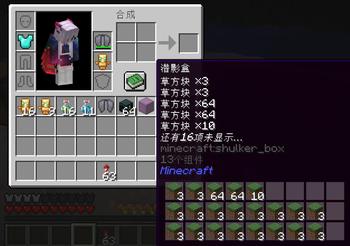
Sort chests with a single click, and keep your Elytra and Totem always ready in their own slots. Potions and Totems now stack.Hover over any Shulker Box or Ender Chest to peek inside instantly – no placing, no opening.
Source-provided project description. FreeMinecraftMods keeps creator credit and adds separate compatibility and decision guidance below.
Project overview
(English) Enhanced Utility Mod – Smarter Inventory & Quick Actions Welcome to a mod that turns everyday Minecraft chores into seamless, intuitive actions. This mod adds a suite of quality‑of‑life improvements that save you time, reduce clutter, and give you more control over your inventory and tools – all without changing the core gameplay. It is designed for both survival and creative players who appreciate efficiency. ✨ Features in Detail 1. Mouse Gestures Draw simple mouse patterns (e.g., circles, swipes) to trigger custom actions. By default, you can quickly swap hotbar slots, open your Ender Chest, or run frequently used commands – but the system is fully configurable, letting you bind your own gestures to any key or command. No more fumbling through menus; just draw and go. 2. One‑Click Organizing A single button press sorts your entire inventory or any open container (chests, barrels, shulker boxes) instantly. 3. Dedicated Elytra & Totem Slots Equip your elytra and a Totem of Undying in their own special slots, separate from your armour and hotbar. This frees up your chestplate slot for other armour and ensures your totem is always active without taking up inventory space. Swap between elytra and chestplate with a single click. 4. Stackable Potions & Totems Potions (including water bottles and lingering versions) and Totems of Undying can now stack up to 16. This dramatically increases your carrying capacity, reduces inventory spam, and makes long expeditions much more manageable – you can bring a full supply of healing or emergency totems without sacrificing half your inventory. 5. Shulker Box & Ender Chest Preview Simply hover your mouse over a shulker box or Ender Chest (in your inventory or in the world) to see a pop‑up window displaying all its contents. No need to place them down or open them – you can instantly check what’s inside, saving time and helping you plan your next move. ⚠️ Important Note This mod must be installed on both the client and the server for full functionality. If you run it client‑side only in multiplayer, certain features (especially stackable potions/totems and the extra slots) may cause desync or item duplication issues. Please ensure your server administrator adds this mod to the server as well. Why Download? Boost your productivity – spend less time sorting and more time exploring. Lightweight and compatible – plays nicely with most other mods (Fabric). Fully configurable – tweak every feature to match your playstyle. No game‑breaking changes – enhances vanilla mechanics without overpowering them. Whether you're a builder, adventurer, or redstone engineer, this mod makes everyday interactions smoother and more enjoyable. Download it today and feel the difference! 中文版 (简体) 实用增强模组 – 智能背包与快捷操作 欢迎来到一个将《我的世界》日常琐事转化为流畅直观操作的模组。 本模组添加了一系列改善游戏体验的实用功能,专注于背包管理、快捷动作和物品使用优化,帮你节省时间、减少混乱,同时不改变游戏核心机制。无论你是生存玩家还是创造模式爱好者,都能感受到效率的提升。 ✨ 功能详解 1. 鼠标手势 通过绘制简单的鼠标轨迹(如画圈、划动)触发自定义操作。默认支持快速切换快捷栏、打开末影箱或执行常用指令,所有手势均可自由绑定到任意按键或命令。从此告别繁琐菜单,一划即达。 2. 一键整理 只需按下一个按钮,即可瞬间整理你的背包或任何容器(箱子、木桶、潜影盒)。 3. 专属鞘翅 & 不死图腾槽位 为鞘翅和不死图腾设置独立的装备槽,与盔甲和快捷栏分离。这样既能腾出胸甲位穿戴其他护甲,又能确保图腾始终生效且不占用背包空间。一键切换鞘翅与胸甲,方便飞行与战斗。 4. 药水 & 不死图腾可堆叠 药水(包括水瓶和滞留药水)以及不死图腾现在可以堆叠至 16 个。这将大幅提升你的携带能力,减少背包杂乱,让长途探险更从容——带足治疗药水或保命图腾,再也不用为格子发愁。 5. 潜影盒 & 末影箱内容预览 只需将鼠标悬停在背包或世界中的潜影盒/末影箱上,即可弹出窗口显示其全部物品。无需放置或打开,就能快速查看内部,方便你规划行动,节省大量时间。 ⚠️ 重要提示 本模组需要同时安装在客户端和服务端才能完全生效。如果在多人游戏中仅客户端安装,部分功能(如堆叠药水/图腾和额外槽位)可能导致同步错误或物品复制问题。请务必让服务器管理员也添加此模组。 为什么下载? 提升效率 – 减少整理时间,把精力留给探索与建造。 轻量且兼容 – 与大多数主流模组(Fabric)和谐共存。 高度可配置 – 每项功能均可按个人喜好调整。 不破坏平衡 – 在增强体验的同时,保留原版生存的挑战性。 无论你是建筑师、冒险家还是红石工程师,这个模组都会让日常操作更顺畅、更愉快。立即下载,体验不一样的便捷!
FreeMinecraftMods decision guide
This mod is classified around equipment, fabric, game mechanics, utility. The classification is intended to help comparison, not replace the creator's own compatibility and installation notes.
The source record was updated on Jul 29, 2026. Check the changelog and file page to see whether that update applies to the version and loader you plan to use.
What to verify before choosing a file
- Confirm that the file is published by the credited creator on the linked official source.
- Match the Minecraft version exactly instead of relying only on a broad category label.
- Read dependencies, incompatibilities, and changelog notes before updating an existing instance.
- Match the loader or server platform and its required version. Forge and NeoForge are not interchangeable.
- Back up worlds and configuration files before testing the project in a long-term save or public server.
Compatibility at a glance
Minecraft versions in this snapshot: 26.2
Before you install
Match the exact Minecraft version and loader, install every required dependency, and test in a separate profile before opening an important world. Keep a backup before changing a working mod list.
Source, licensing, and corrections
FreeMinecraftMods does not mirror the project files. Use the official source for downloads, release notes, dependencies, support, and licensing details. Project names, images, and creator-written descriptions remain the property of their respective owners.
How listings are reviewed | Report incorrect project information | Rights-holder and DMCA information