

Mod - Modrinth
Vanilla Refresh
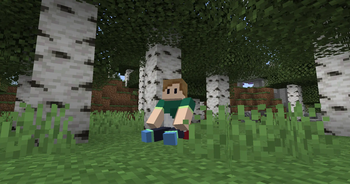
Enhancing Minecraft's experience with a variety of 30+ QOL features, like player sitting and a day counter.
Source-provided project description. FreeMinecraftMods keeps creator credit and adds separate compatibility and decision guidance below.
Project overview
*** # About: Vanilla Refresh is a quality of life expansion, aiming to make small improvements to Minecraft in its gameplay, immersion, creative mode, multiplayer and more. Features aim to enhance the game whilst still maintaining the vanilla experience. ### Future Updates Note I'll continue updating these packs when I can, but maintenance is becoming more difficult with the fast drops cycle. If you'd like to help keep my Minecraft projects up to date, let me know on [Discord]( https://discord.gg/XZVARKkjwt) or submit a pull request on [GitHub!](https://github.com/SpluoSplatus/Vanilla-Refresh) # Config / Settings **Toggle features in the settings menu by using `/function vanilla_refresh:_settings` in chat** ## ⚠️ Command Confirmation **For 1.21.6+** I recommend using this mod that disables the command confirmation in the settings menu when clicking ui: [https://modrinth.com/mod/nocc](https://modrinth.com/mod/nocc) # Features: With over 30+ features and still adding, Vanilla Refresh continues improving Minecraft. Any features you don't desire, you can disable and re-enable at anytime via the settings menu Main Features - Player Sitting - Sit anywhere by facing straight down, crouching and right clicking. Your hand slot must be empty. - Mob Health Display: - Displays the health of a mob near you above your hotbar - Daycounter: - Counts the days of the server and displays them at the start of each day - Also displays when first joining a server - On milestone days like day 100, or any other day milestone thats a multiple of 100, a special daycounter animation will play - Homing Experience Orbs - Killed a ghast from a far distance? Those orbs will come straight back to you instead of into lava - Craft Sounds - When crafting items, a woody crafting sound will be played, along with a light particle animation. Makes crafting anything satisfying. - The sound can vary depending on what you craft, like tools, and whether you crafted multiple items at once. Special items like beacons and enchanting tables have especially unique sounds for crafting too! - Crops XP - When breaking crops, wheat, pumkins, nether wart, etc, you'll have a chance of receiving a bit of experience - Jukebox Music Override. - When playing jukebox music, it'll stop and override Minecraft game music currently playing from nearby players. - Extra Loyal Tridents - If your (loyalty) trident inevitably falls into the void, it'll no longer meet its end, instead it will bounce right back to you. - Improved Baby Zombies - Baby zombies have been nerfed! Halves the health of baby zombies. However, they can now sometimes sprint jump! - A critical hit with a diamond/netherite sword one shots baby zombies - Improved/Local Death Sound - Upon death, an improved death sound effect related to how you died will play. Makes your death a little more dramatic. - Can be configured to a set sound instead - Better Armor Stands - They now have arms, and a bunch of different poses for you to display your armor, items, and weapons - Power a lever near them to swap their pose - You can add an item to an armor stand then right click it with a tripwire hook to turn it into a tool rack. They'll hook onto to the wall the armor stand is against, perfect for displaying your swords and tools. - Drop Ladder - Found yourself a big drop in a cave below you? Press sneak whilst on a ladder to extend its length down and create hanging ladders allowing you to descend down. - Totem Works In Void - Falling into the void with a totem in hand/offhand will enter you into a controllable float mode of levitation till you reach land. - Player Head Drop: - Upon death, your player head will drop. Place it anywhere for a cute display of your misfortune. - Echo Shard Silence - Drop an echo shard ontop of a mob to silence it. You can get that echo shard back by placing water ontop of the mob, or directly killing the mob. - Time Offset - You know how the Minecraft F3 Day oddly starts on day 0? Vanilla Refresh adds +1 so that when you first create the world, you're on day 1! On existing worlds, your world will have +1 day added. - Wither Head Drop: - Upon defeating the Wither, it'll drop its head as a trophy of your win. - Equipable Banners - To equip a banner, triple click sneak whilst holding a banner. Note your head slot must be empty - Improved Player Animations - New player animations for leveling up and splashing on water at different heights! - Improved Block Animations - Blocks including Enchanting Tables, Brewing Stands, Beacons, Wither Skeleton Skulls, Dragon Eggs, and Jukeboxes will have improved block animations. Immersion x100! - Jukebox animations can be enhanced even more by placing a note block below a jukebox - Subtitles on Major Events - Major events like summoning the wither and entering the end will display a dramatic title on screen - Subtitles on Biome Discovery - When finding a new biome, it'll display the name/category name of the biome as a title on screen - Trimmed Armored Piglins - Armored piglins now have a chance of spawning in with their armor pieces trimmed. About 8% of all piglins will have trimmed armor, and bastion remnants will have 16% of all piglins with trimme
FreeMinecraftMods decision guide
This mod is most relevant to players looking for game mechanics, social, utility on datapack, fabric, forge, neoforge. Treat those labels as discovery hints, then verify the exact file and dependency list on the official project page.
The source record was updated on Jul 23, 2026. Check the changelog and file page to see whether that update applies to the version and loader you plan to use.
What to verify before choosing a file
- Confirm that the file is published by the credited creator on the linked official source.
- Match the Minecraft version exactly instead of relying only on a broad category label.
- Read dependencies, incompatibilities, and changelog notes before updating an existing instance.
- Match the loader or server platform and its required version. Forge and NeoForge are not interchangeable.
- Back up worlds and configuration files before testing the project in a long-term save or public server.
Compatibility at a glance
Minecraft versions in this snapshot: 1.20.3, 1.20.4, 1.20.5, 1.20.6, 1.21, 1.21.1, 1.21.2, 1.21.3, 1.21.4, 1.21.5, 1.21.6, 1.21.7
Loaders and platforms: datapack, fabric, forge, neoforge, quilt
Before you install
Match the exact Minecraft version and loader, install every required dependency, and test in a separate profile before opening an important world. Keep a backup before changing a working mod list.
Source, licensing, and corrections
FreeMinecraftMods does not mirror the project files. Use the official source for downloads, release notes, dependencies, support, and licensing details. Project names, images, and creator-written descriptions remain the property of their respective owners.
How listings are reviewed | Report incorrect project information | Rights-holder and DMCA information
This source record is available for discovery, but it does not yet contain enough verified description, classification, image, freshness, or compatibility information to be indexed as a full editorial page. It is therefore marked noindex and is not eligible for advertising.