

Source-provided project description. FreeMinecraftMods keeps creator credit and adds separate compatibility and decision guidance below.
Project overview
# Anytag Datapack (Tag Anything, Anywhere) Have you ever wanted to place **name tags** on anything? Now you can! `Anytag` is a Minecraft Datapack which allows players to craft a special *Anytag* item through a simple recipe. The item is used so any player can right-click on any block with the item in their hand, which will then place flying text where the player is pointing at and simultaneously consume itself. ## Crafting The recipe for crafting the *Anytag* item is simple. You just need a name tag and a sign of any kind (Dark oak sign, Oak sign, Spruce sign, etc.) and place them in this order: 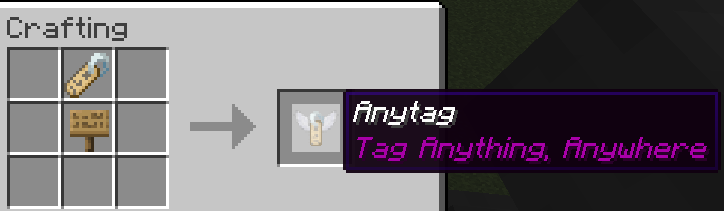 You can rename the *Anytag* item according to your desires. ## Usage Here is a short depiction of how the *Anytag* item is crafted and used: 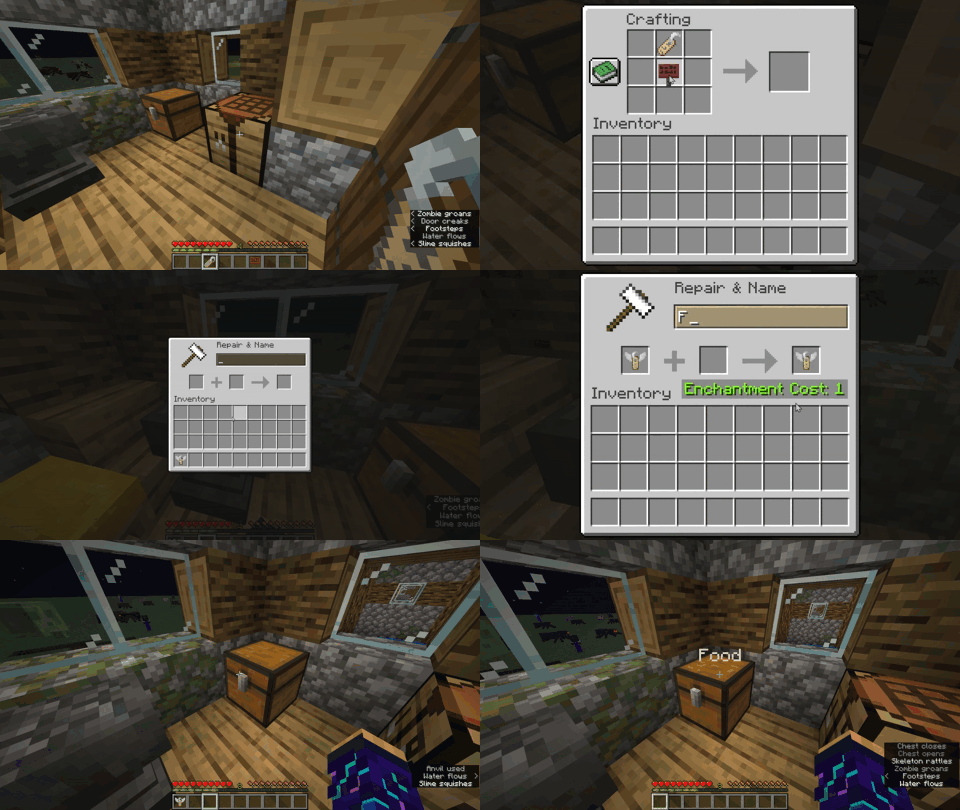 **Right-clicking** the *Anytag* item on any block will place flying text with the custom name of *Anytag* item. **Right-clicking** in the middle of flying text will remove the text and drop the previously used *Anytag* item. **Left-clicking** in the middle of flying text will remove the text and drop the *name tag* item instead of the *Anytag* item. 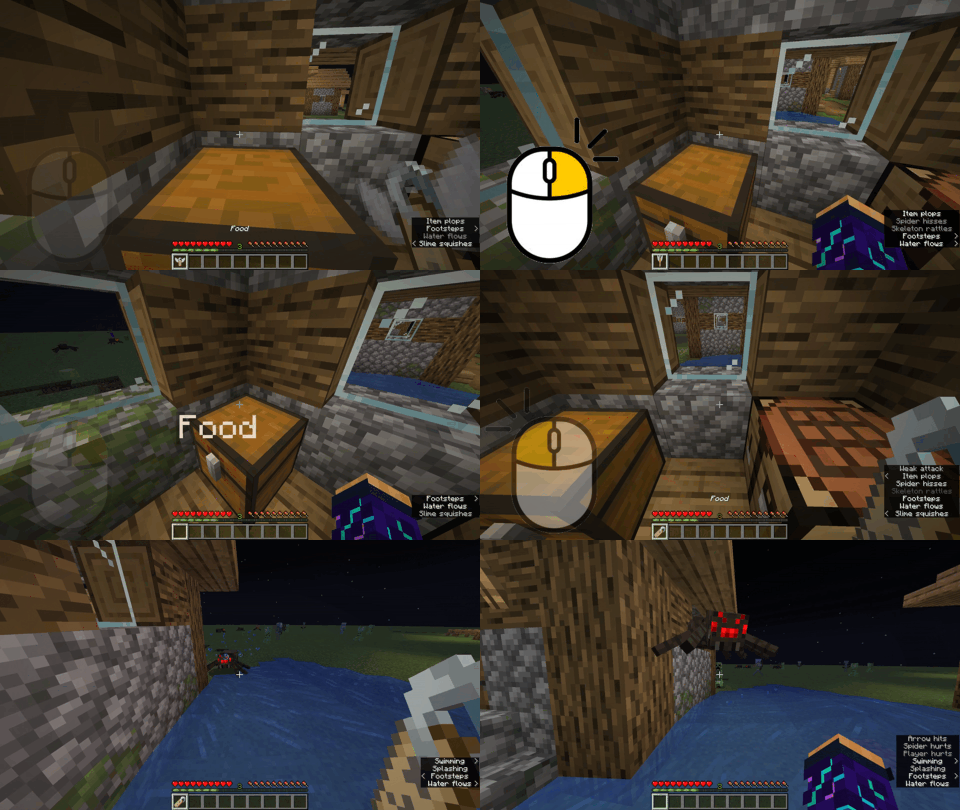 > Try pressing `F3 + B` in-game to see the hitbox of the floating text. 
FreeMinecraftMods decision guide
This mod is most relevant to players looking for decoration, social, utility on datapack, fabric, forge, quilt. Treat those labels as discovery hints, then verify the exact file and dependency list on the official project page.
The latest stored update signal is Jun 14, 2024. Older projects can still work well, but they deserve extra compatibility testing before being added to a current world or public server.
What to verify before choosing a file
- Confirm that the file is published by the credited creator on the linked official source.
- Match the Minecraft version exactly instead of relying only on a broad category label.
- Read dependencies, incompatibilities, and changelog notes before updating an existing instance.
- Match the loader or server platform and its required version. Forge and NeoForge are not interchangeable.
- Back up worlds and configuration files before testing the project in a long-term save or public server.
Compatibility at a glance
Minecraft versions in this snapshot: 1.19.4, 1.20, 1.20.1, 1.20.2, 1.20.3, 1.20.4, 1.20.5, 1.20.6, 1.21
Loaders and platforms: datapack, fabric, forge, quilt
Before you install
Match the exact Minecraft version and loader, install every required dependency, and test in a separate profile before opening an important world. Keep a backup before changing a working mod list.
Source, licensing, and corrections
FreeMinecraftMods does not mirror the project files. Use the official source for downloads, release notes, dependencies, support, and licensing details. Project names, images, and creator-written descriptions remain the property of their respective owners.
How listings are reviewed | Report incorrect project information | Rights-holder and DMCA information
This source record is available for discovery, but it does not yet contain enough verified description, classification, image, freshness, or compatibility information to be indexed as a full editorial page. It is therefore marked noindex and is not eligible for advertising.