

Resource Pack - Modrinth
Emilia Totem
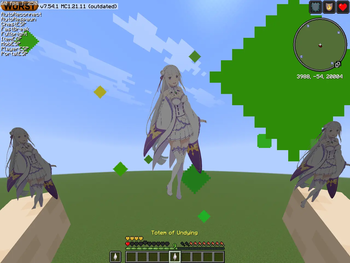
A cinematic Emilia-themed Totem of Undying resource pack for Minecraft 1.21.11, featuring a custom Emilia texture and voice sound.
Source-provided project description. FreeMinecraftMods keeps creator credit and adds separate compatibility and decision guidance below.
Project overview
# Emilia Totem A cinematic Emilia-themed **Totem of Undying** resource pack for Minecraft. ## ✨ Features * Replaces the vanilla Totem of Undying with a custom **Emilia** texture. * Includes a custom **Emilia voice sound** when the Totem activates. * Features a cinematic anime-inspired visual style with purple and blue magical effects. * Designed to keep Emilia clearly visible and recognizable in-game. * Made for **Minecraft 1.21.11**. ## 🎵 Custom Sound When the Totem activates, Emilia says a short Japanese voice line in her iconic voice. ## 📦 Installation 1. Download the resource pack. 2. Open Minecraft and go to **Options → Resource Packs**. 3. Open the resource pack folder. 4. Move the downloaded `.zip` file into the folder. 5. Enable **Emilia Totem** in-game. ## 📜 Usage You are free to download and use this resource pack for personal gameplay. Please do not re-upload, redistribute, modify, or claim the pack as your own without permission. If you enjoy it, feel free to leave a ❤️ or follow the project for future updates!
FreeMinecraftMods decision guide
This resource pack is classified around 512x+, combat, items, minecraft. The classification is intended to help comparison, not replace the creator's own compatibility and installation notes.
The source record was updated on Sep 21, 2026, which is a recent freshness signal. A recent date does not guarantee support for every loader or Minecraft version, so still inspect the current file list.
What to verify before choosing a file
- Confirm that the file is published by the credited creator on the linked official source.
- Match the Minecraft version exactly instead of relying only on a broad category label.
- Read dependencies, incompatibilities, and changelog notes before updating an existing instance.
- Check pack order and test for model, font, language, and interface conflicts with other packs.
Compatibility at a glance
Minecraft versions in this snapshot: 1.21.11
Before you install
Keep the original ZIP unless the creator says otherwise. Check pack order when multiple packs change the same textures, models, fonts, or interface files.
Source, licensing, and corrections
FreeMinecraftMods does not mirror the project files. Use the official source for downloads, release notes, dependencies, support, and licensing details. Project names, images, and creator-written descriptions remain the property of their respective owners.
How listings are reviewed | Report incorrect project information | Rights-holder and DMCA information