
Mod - Modrinth
Immersive Blood Splatters
immersive blood splatter decals effects. spooky and gory
Source-provided project description. FreeMinecraftMods keeps creator credit and adds separate compatibility and decision guidance below.
Project overview
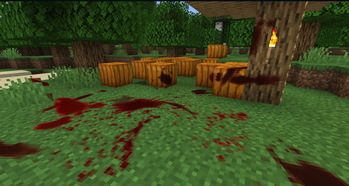
🩸 About 🩸 Splatter makes wounds bleed. Blood sprays out of a hit and stains whatever it lands on, then dries away. This mod is still **experimental**. Requires [Moonlight Library](https://modrinth.com/mod/moonlight). 🔪 Features 🔪 - Blood sprays in the direction the blow came from and stains floors, walls and ceilings - Stains wrap around blocks and stop where something is in the way, instead of being flat squares - Splatter size depends on how hard the hit was and how big the mob is - Killing something leaves a pool of blood under the body - Wounded mobs get bloody themselves, and the more you hit them the worse it gets - Blood on a ceiling drips down onto what is below - Stains dry up and fade away after a while - Skeletons, golems, slimes and other bloodless mobs don't bleed - Fade time, drips, spray amount and which mobs bleed are all configurable ❤️ Support Me ❤️ Modding takes a lot of my time. If you like what I do and want to support me, you'll receive a custom **Globe** and/or **Statue** just for you - this also applies if you buy a server from Akliz using the code below. Need a server? **Akliz** offers top-tier servers built for modded Minecraft, with a great community and support team. Use code **"supplementaries"** to get **20% off** and support me at the same time! 🦉 Our Mods 🦉
FreeMinecraftMods decision guide
This mod is most relevant to players looking for decoration on fabric, neoforge. Treat those labels as discovery hints, then verify the exact file and dependency list on the official project page.
The source record was updated on Sep 3, 2026, which is a recent freshness signal. A recent date does not guarantee support for every loader or Minecraft version, so still inspect the current file list.
What to verify before choosing a file
- Confirm that the file is published by the credited creator on the linked official source.
- Match the Minecraft version exactly instead of relying only on a broad category label.
- Read dependencies, incompatibilities, and changelog notes before updating an existing instance.
- Match the loader or server platform and its required version. Forge and NeoForge are not interchangeable.
- Back up worlds and configuration files before testing the project in a long-term save or public server.
Compatibility at a glance
Minecraft versions in this snapshot: 1.21.1, 26.1.2
Loaders and platforms: fabric, neoforge
Before you install
Match the exact Minecraft version and loader, install every required dependency, and test in a separate profile before opening an important world. Keep a backup before changing a working mod list.
Source, licensing, and corrections
FreeMinecraftMods does not mirror the project files. Use the official source for downloads, release notes, dependencies, support, and licensing details. Project names, images, and creator-written descriptions remain the property of their respective owners.
How listings are reviewed | Report incorrect project information | Rights-holder and DMCA information
This source record is available for discovery, but it does not yet contain enough verified description, classification, image, freshness, or compatibility information to be indexed as a full editorial page. It is therefore marked noindex and is not eligible for advertising.