

Mod - Modrinth
FreshLoot
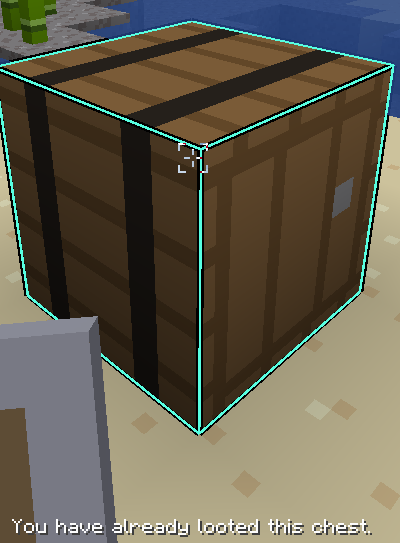
Is a player not entitled to his loot? Now, every player gets his own loot when opening a chest. Destroying a chest to prevent others from looting it is shameful.
Source-provided project description. FreeMinecraftMods keeps creator credit and adds separate compatibility and decision guidance below.
Project overview
Make looting structures and dungeons more "fair" on your SMP server. A chest or barrel with a loot table gives out an **independent loot roll to each player**, once per player and per position. ## The problem this solves By default, a loot chest (in a dungeon, a structure, an ancient city, a boat, etc.) generates its contents once, on first open. The first player to open it picks from the pool; everyone after that only finds whatever is left; if anything is left. On a multiplayer server, that just rewards whoever gets there fastest. This might not be very fair; *your server, your rules*. With **FreshLoot**, every player who opens the chest for the first time gets their own roll, as if he was alone in front of a brand-new chest. Once a player has looted it, he can't pull a second roll from that position. ## Mechanics - **Opening**: when a player opens a chest or barrel carrying a loot table, the mod checks whether he already has looted this position. If he has, the open is denied (no GUI ever shows up). If not, loot is generated normally for him. - **One chest at a time**: if a player has a chest open, no other player can open it at the same time. He has to wait for the first one to close his GUI. - **Rotation**: when the GUI closes, the chest is destroyed and immediately replaced with a new one, carrying the same loot table, ready for the next player. This same mechanism is what lets the mod work without depending on in-memory state that could get lost: the new chest carries its loot table directly in its own data, exactly like a vanilla chest that's never been opened. - **Breaking instead of opening is griefing**: breaking a chest that still has an unclaimed loot table (whether it's brand-new, freshly put back into rotation, or *currently* open by someone, including the breaker themselves) sends a public message to the server and empties the loot before the block drops. The chest then gives out nothing: not to the player who broke it, not to anyone after them, since the position itself is destroyed (unless *currently* open by someone, in case the content is dropped). - **Persistence**: the record of "which player has already looted which position" survives a server restart. Everything else (who currently has a chest open, etc.) is deliberately non-persistent state. It only makes sense while the server is running. - **Spectator mode**: entirely ignored. A spectator can look inside any chest, including one currently open by a player, without triggering any of the rules above. ## Known limitations - **Double chests aren't handled.** A double chest (two single chests joined together) is left to full-vanilla behavior. The mod doesn't touch it at all, even if it carries a loot table. - **Only chests and barrels.** Any other loot-table-carrying container (shulker box holder, modded barrel, etc.) follows standard vanilla behavior. - **Rotation breaks and replaces the block.** The refresh mechanism relies on physically destroying the chest and recreating it identically. It's invisible in-game, but it means a chest "in rotation" literally changes block identity on every cycle. A third-party mod that tracks block entities by reference might not be happy about that. ## Wishlist - Double chest support. - Support for other loot-table-carrying containers (maybe) - External configuration, instead of hardcoded constants (e.g. being able to disable the grief message, edit its text, or even its behavior). - Translation of the grief message (currently English-only, not localized). ## Issues If you find a bug, want a feature added or want to contribute, please open an issue or make a PR on GitHub.
FreeMinecraftMods decision guide
This mod is most relevant to players looking for adventure on fabric. Treat those labels as discovery hints, then verify the exact file and dependency list on the official project page.
The source record was updated on Sep 21, 2026, which is a recent freshness signal. A recent date does not guarantee support for every loader or Minecraft version, so still inspect the current file list.
What to verify before choosing a file
- Confirm that the file is published by the credited creator on the linked official source.
- Match the Minecraft version exactly instead of relying only on a broad category label.
- Read dependencies, incompatibilities, and changelog notes before updating an existing instance.
- Match the loader or server platform and its required version. Forge and NeoForge are not interchangeable.
- Back up worlds and configuration files before testing the project in a long-term save or public server.
Compatibility at a glance
Minecraft versions in this snapshot: 1.21.4, 1.21.5, 1.21.6, 1.21.7, 1.21.8, 1.21.9, 1.21.10, 1.21.11
Loaders and platforms: fabric
Before you install
Match the exact Minecraft version and loader, install every required dependency, and test in a separate profile before opening an important world. Keep a backup before changing a working mod list.
Source, licensing, and corrections
FreeMinecraftMods does not mirror the project files. Use the official source for downloads, release notes, dependencies, support, and licensing details. Project names, images, and creator-written descriptions remain the property of their respective owners.
How listings are reviewed | Report incorrect project information | Rights-holder and DMCA information