

Mod - Modrinth
Max Enchantment Star
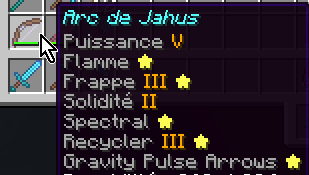
Show a star (⭐) next to your enchantments if they are at their maximum level.
Source-provided project description. FreeMinecraftMods keeps creator credit and adds separate compatibility and decision guidance below.
Project overview
# MaxEnchantStar Adds a ⭐ after an enchantment's name when that enchantment is at its effective maximum level. ## The problem this solves Vanilla tooltips show the enchantment name and level, but never whether that level is the max. On a maxed piece of gear, you still have to remember (or look up) each enchantment's cap. With mods that raise enchantment caps (e.g. [NoMaxEnchant](https://modrinth.com/mod/jahus-nomaxenchant)) or datapacks that add custom enchantments, the effective maximum canalso differ from what the client assumes or the client can simply be ignorant of the maximum level. **MaxEnchantStar** appends a star to every enchantment line that is already at its effective maximum, so maxed enchants are visible at a glance. ## Environment **Client-side only.** MaxEnchantStar does not need to be installed on the server. It reads the effective maximum enchantment levels provided by [NoMaxEnchant](https://modrinth.com/mod/jahus-nomaxenchant) *when available*. Without NoMaxEnchant providing effective maximum levels, MaxEnchantStar falls back to the maximum level from the local enchantment registry. The star is purely visual. It does not change anvil behaviour, enchanting table results, or any gameplay rule. ## Known limitations * **Effective max source.** Without a source of raised maximum levels, the client can only use the registry maximum. If another mod raises the *anvil* cap without changing the registry, the star stays on the vanilla maximum unless that mod also publishes its effective maximum levels using the protocol supported by MaxEnchantStar. * **Other tooltip rebuilders.** Mods that fully replace enchantment tooltip text can still interfere. MaxEnchantStar uses a method wrap so it usually still sees their final text; if a mod never goes through `Enchantment.getName` at all, the star will not appear for that path. ## Mechanics * **Target**: `Enchantment.getName(RegistryEntry, int)`, wrapped so the star is applied to whatever text was produced (vanilla or another mod's replacement). * **Condition**: star is added when `level >= effectiveMax` for that enchantment. * **Effective max resolution**: 1. If effective maximum levels have been provided by NoMaxEnchant, then use that value for the enchantment. 2. Otherwise, fall back to `entry.value().getMaxLevel()` from the local registry. * **Formatting**: the star is appended as a separate styled fragment so existing colour / style on the name is preserved. ## Compatibility ### NoMaxEnchant MaxEnchantStar works particularly well with [NoMaxEnchant](https://github.com/DarthJahus/minecraft-nomaxenchant/). NoMaxEnchant provides MaxEnchantStar with the effective maximum enchantment levels used by the server. This allows MaxEnchantStar to correctly identify maxed enchantments even when their effective maximum is higher than the vanilla registry maximum. **NoMaxEnchant is not a dependency of MaxEnchantStar.** If NoMaxEnchant is not installed, MaxEnchantStar simply falls back to the local registry maximum. ### Enchantments Normalizer MaxEnchantStar is compatible with [Enchantments Normalizer](https://modrinth.com/mod/enchantments-normalizer), that changes how high enchantment levels are displayed, for example displaying `CLV` instead of the raw `enchantment.level.155` text for level 155. MaxEnchantStar adds the ⭐ to the resulting enchantment text without replacing the level formatting, so the two mods can be used together. For example: ```text Sharpness CLV ⭐ ``` ### NBT Editor MaxEnchantStar is compatible with [NBT Editor](https://modrinth.com/mod/nbt-editor). NBT Editor can display the enchantment's maximum level after the current level, for example: ```text Sharpness 7/7 ``` MaxEnchantStar preserves the additional `/7` information and only adds the ⭐ when the current level has reached the effective maximum. These mods can therefore be combined, for example: ```text Sharpness VII/7 ⭐ ``` ## Configuration None required for the default behaviour. MaxEnchantStar uses the effective maximum provided by NoMaxEnchant when available, otherwise it uses the local registry maximum. ## Licence [Apache 2.0 Licence](https://github.com/DarthJahus/minecraft-maxenchantstar/blob/master/LICENSE.md)
FreeMinecraftMods decision guide
This mod is most relevant to players looking for equipment, game mechanics, magic on fabric. Treat those labels as discovery hints, then verify the exact file and dependency list on the official project page.
The source record was updated on Sep 14, 2026, which is a recent freshness signal. A recent date does not guarantee support for every loader or Minecraft version, so still inspect the current file list.
What to verify before choosing a file
- Confirm that the file is published by the credited creator on the linked official source.
- Match the Minecraft version exactly instead of relying only on a broad category label.
- Read dependencies, incompatibilities, and changelog notes before updating an existing instance.
- Match the loader or server platform and its required version. Forge and NeoForge are not interchangeable.
- Back up worlds and configuration files before testing the project in a long-term save or public server.
Compatibility at a glance
Minecraft versions in this snapshot: 1.21.4
Loaders and platforms: fabric
Before you install
Match the exact Minecraft version and loader, install every required dependency, and test in a separate profile before opening an important world. Keep a backup before changing a working mod list.
Source, licensing, and corrections
FreeMinecraftMods does not mirror the project files. Use the official source for downloads, release notes, dependencies, support, and licensing details. Project names, images, and creator-written descriptions remain the property of their respective owners.
How listings are reviewed | Report incorrect project information | Rights-holder and DMCA information
This source record is available for discovery, but it does not yet contain enough verified description, classification, image, freshness, or compatibility information to be indexed as a full editorial page. It is therefore marked noindex and is not eligible for advertising.